- Published on
Managing State
- Authors

- Name
- 李丹秋
Choosing the State Structure
- 合并关联的 state。如果你总是同时更新两个或更多的 state 变量,请考虑将它们合并为一个单独的 state 变量。
- 避免互相矛盾的 state。当 state 结构中存在多个相互矛盾或“不一致”的 state 时,你就可能为此会留下隐患。应尽量避免这种情况。
- 避免冗余的 state。如果你能在渲染期间从组件的 props 或其现有的 state 变量中计算出一些信息,则不应将这些信息放入该组件的 state 中。
- 避免重复的 state。当同一数据在多个 state 变量之间或在多个嵌套对象中重复时,这会很难保持它们同步。应尽可能减少重复。
- 避免深度嵌套的 state。深度分层的 state 更新起来不是很方便。如果可能的话,最好以扁平化方式构建 state。
Preserving and Resetting State
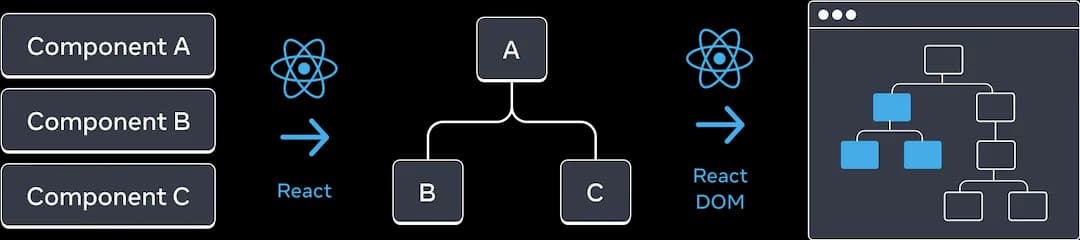
state 与树中的某个位置相关联
只要一个组件还被渲染在 UI 树的相同位置,React 就会保留它的 state。 如果它被移除,或者一个不同的组件被渲染在相同的位置,那么 React 就会丢掉它的 state。
相同位置的相同组件会使得 state 被保留下来
export default function App() {
  const [isFancy, setIsFancy] = useState(false);
  if (isFancy) {
    return (
      <div>
        <Counter isFancy={true} />
        <label>
          <input
            type="checkbox"
            checked={isFancy}
            onChange={e => {
              setIsFancy(e.target.checked)
            }}
          />
          使用好看的样式
        </label>
      </div>
    );
  }
  return (
    <div>
      <Counter isFancy={false} />
      <label>
        <input
          type="checkbox"
          checked={isFancy}
          onChange={e => {
            setIsFancy(e.target.checked)
          }}
        />
        使用好看的样式
      </label>
    </div>
  );
}

function Counter({ isFancy }) {
  const [score, setScore] = useState(0);
  const [hover, setHover] = useState(false);

  let className = 'counter';
  if (hover) {
    className += ' hover';
  }
  if (isFancy) {
    className += ' fancy';
  }

  return (
    <div
      className={className}
      onPointerEnter={() => setHover(true)}
      onPointerLeave={() => setHover(false)}
    >
      <h1>{score}</h1>
      <button onClick={() => setScore(score + 1)}>
        加一
      </button>
    </div>
  );
}
对 React 来说重要的是组件在 UI 树中的位置,而不是在 JSX 中的位置!
相同位置的不同组件会使state重置
mport { useState } from 'react';

export default function Scoreboard() {
  const [isPlayerA, setIsPlayerA] = useState(true);
  return (
    <div>
      {isPlayerA &&
        <Counter person="Taylor" />
      }
      {!isPlayerA &&
        <Counter person="Sarah" />
      }
      <button onClick={() => {
        setIsPlayerA(!isPlayerA);
      }}>
        Next player!
      </button>
    </div>
  );
}

function Counter({ person }) {
  const [score, setScore] = useState(0);
  const [hover, setHover] = useState(false);

  let className = 'counter';
  if (hover) {
    className += ' hover';
  }

  return (
    <div
      className={className}
      onPointerEnter={() => setHover(true)}
      onPointerLeave={() => setHover(false)}
    >
      <h1>{person}'s score: {score}</h1>
      <button onClick={() => setScore(score + 1)}>
        Add one
      </button>
    </div>
  );
}
这样两个Counter占据不同的位置,切换的时候重新生成新的节点,就能够实现重置。 也可以使用Key来标识不同的组件,key不止只能使用在list当中
如何在切换组件的时候,保留状态?
- 与其只渲染现在这一个聊天,你可以把 所有 聊天都渲染出来,但用 CSS 把其他聊天隐藏起来。这些聊天就不会从树中被移除了,所以它们的内部 state 会被保留下来。这种解决方法对于简单 UI 非常有效。但如果要隐藏的树形结构很大且包含了大量的 DOM 节点,那么性能就会变得很差。
- 你可以进行 状态提升 并在父组件中保存每个收件人的草稿消息。这样即使子组件被移除了也无所谓,因为保留重要信息的是父组件。这是最常见的解决方法。
- 除了 React 的 state,你也可以使用其他数据源。例如,也许你希望即使用户不小心关闭页面也可以保存一份信息草稿。要实现这一点,你可以让 Chat 组件通过读取 localStorage 对其 state 进行初始化,并把草稿保存在那里。